What exactly does the IRS require in a mileage log?
For any business mileage deduction using the Standard mileage rate method or the Actual expenses method, the IRS requires adequate records to substantiate your claim.
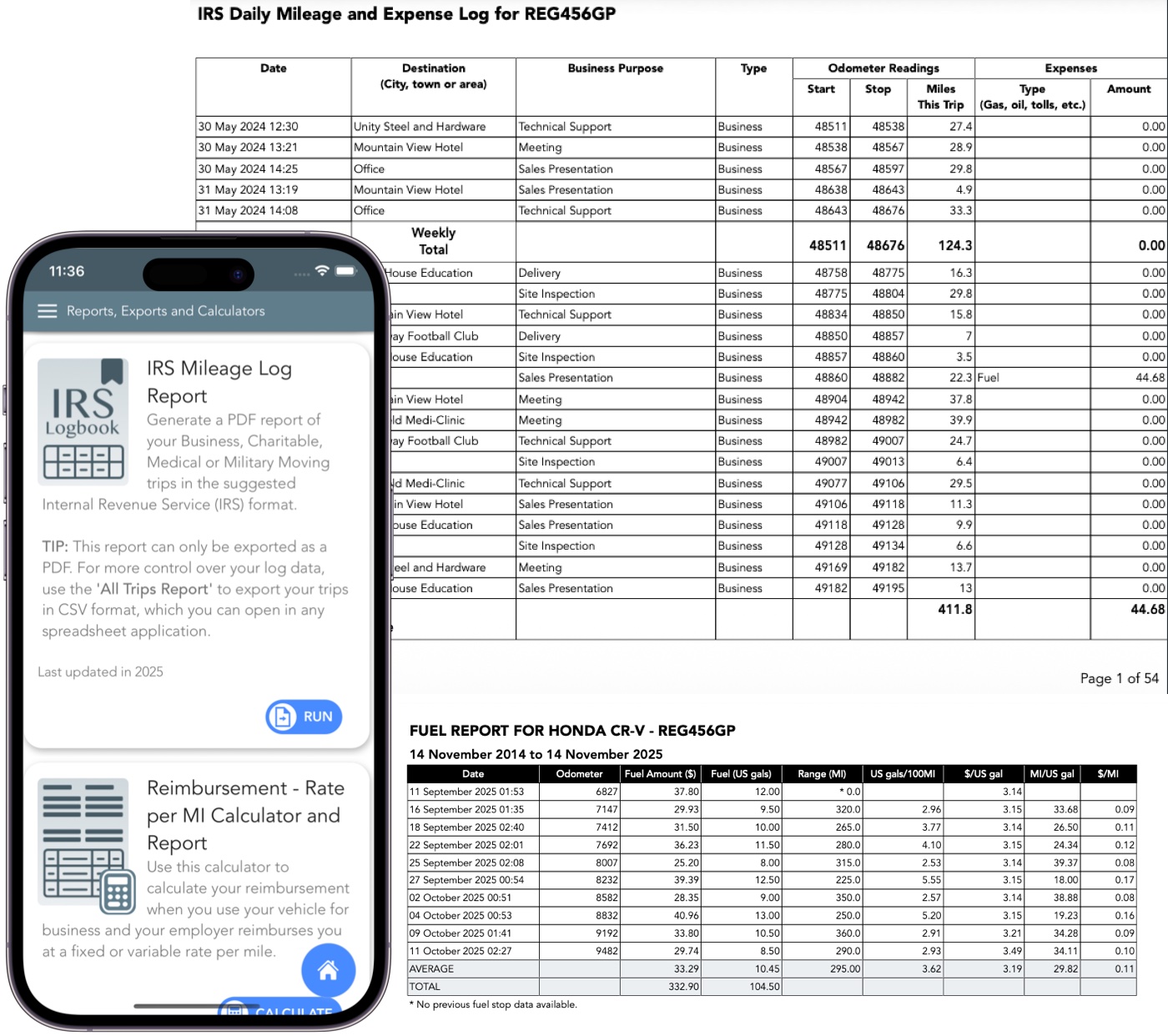
An IRS Compliant mileage log forms part of these records, and must include all of the following for every business trip:
- the date of each trip
- starting and ending locations (e.g. addresses and cities)
- business purpose of the trip
- miles driven per trip
- Year-start and Year-end odometer readings
It is important that all required details are present and your records are consistent, accurate, and created at the time of travel.
Supporting evidence like calendars, timesheets and receipts can help substantiate your claim.
What if I didn't keep a mileage log?
The IRS is strict about mileage deductions. For vehicle expenses the IRS requires adequate, contemporaneous records to prove business mileage.
Without them, the IRS generally disallows the deduction because the expenses are considered unsubstantiated.
You can attempt to reconstruct your mileage using credible supporting evidence such as Calendar appointments, Email confirmations, Client invoices, Receipts (gas, parking, tolls),
GPS history (Google Maps Timeline, Apple Maps, vehicle telematics), Travel itineraries, Notes from CRM or scheduling apps.
The more consistent and detailed the reconstruction, the more likely the IRS is to accept at least part of your deduction.
How contemporaneous does the mileage log need to be and can I reconstruct it later or do an estimate?
Records should be made at or near the time of the expense for reliability, not months later.
Reconstruction is possible if based on contemporaneous evidence (like calendars or receipts).
However, rough estimates or mileage logs created long afterward are insufficient. It can lead to disallowance in audits.
Do I need to record odometer readings?
Yes. Annual beginning and ending odometer totals are necessary to calculate the business use percentage.
Beginning and ending odometer readings per trip help verify your total mileage and make your log more defensible in an audit.
Trip Logbook uses odometer values as a core part of your history.
What counts as a valid business purpose for a trip?
The trip must be ordinary and necessary for your trade or business, such as client meetings, supply runs, or travel between job sites (if no regular office).
Commuting from home to a regular workplace generally doesn't qualify, and mixed personal/business trips require strict allocation of only the business portion.
Can I use a mileage tracking app instead of a paper log?
Yes, apps are acceptable as long as they capture the required details (date, miles, locations, purpose, year start/end odo) contemporaneously and can produce reports that meet IRS substantiation standards.
The IRS doesn't specify methods but focuses on adequacy of records.
What happens if I get audited and my mileage log is incomplete or rejected?
If records are inadequate, the entire mileage deduction may be disallowed, potentially leading to owed taxes, penalties, or adjustments.
You can attempt to reconstruct with supporting evidence, but the Cohan rule (allowing estimates in rare cases) has limitations and doesn't apply to vehicle expenses without strict proof.
How strict does the log need to be—do I have to list every single trip?
Logs must be detailed and accurate. Pure estimates are not acceptable. Every business trip should be recorded where practical.
In limited cases, IRS-accepted sampling methods may be used if they are representative, consistent, and supported by contemporaneous records.
"Good enough" won't suffice; aim for completeness to avoid audit issues.
Can I switch between standard mileage rate and actual expenses method year-to-year?
You choose one method per vehicle per year and can't switch mid-year. You also cannot claim both for the same vehicle in the same year.
If you use the standard mileage rate in the first year the vehicle is placed in service for business, you can't claim Section 179 or special depreciation allowances.
You can switch to actual expenses in later years (using straight-line depreciation for any remaining basis), but switching back to standard is restricted if you've used actual methods like MACRS previously.
What mileage rate should I use, and does it change for different purposes?
For business use, use the IRS standard mileage rate for the applicable tax year (72.5 cents per mile for 2026, per IRS guidance available at the time of writing).
It differs for other purposes: 20.5 cents per mile for medical or moving (military only), and 14 cents per mile for charity.
Rates are updated annually by the IRS and apply to the standard mileage method.
Rates are published by the IRS annually and apply only to the specified tax year.
How long do I need to keep my mileage logs and supporting records?
Generally, retain records for at least 3 years from the date you file the return. This is the standard IRS statute of limitations for deductions.
For depreciation-related deductions, keep them longer—up to 3 years after the recovery period ends (typically 5+ years for vehicles).
Or indefinitely if needed for ongoing IRS matters.
Is the standard mileage rate better than actual vehicle expenses?
It depends on vehicle cost, miles driven, fuel, repairs, depreciation, and record quality.
Do rideshare, delivery, or gig-economy drivers have different mileage rules?
The same rules apply. But with higher scrutiny and stronger need for clean, consistent logs.
Is an Excel mileage log IRS‑compliant?
Yes. The IRS cares about the completeness and consistency of your records, not the specific tool.
An Excel log can be compliant as long as it includes the required fields and is updated reliably.
Will the IRS accept logs from apps?
Yes. What matters is that the information is accurate, consistent, and complete. Trip Logbook
structures your data so it can be exported and reviewed like any other mileage log.
What are the acceptable mileage log formats?
The IRS does not require any specific template. You can use:
- Paper logbook
- Spreadsheet (Microsoft Excel, Google Sheets)
- Mileage tracking apps
- Calendar entries with required details
What matters most is that all required details are present and your records are consistent, accurate, and created at or near the time of travel.
Can I backfill my mileage at year‑end?
The IRS expects contemporaneous mileage records, not rough reconstructions done months later.
Using an app during the year removes the stress of rebuilding your travel history from memory.
What about mixed personal and business trips?
Only the business portion of your mileage is deductible. Trip Logbook lets you classify trips as
Business or Personal so you can clearly separate deductible mileage from non‑deductible driving.
What does the IRS Look for in an Audit?
To withstand IRS scrutiny:
- Logs must be complete and detailed (not vague).
- Must show business purpose clearly tied to your trade or profession.
- Must show separation between personal and business miles.
- Must match total annual odometer readings (start/end of year).