Trip Logbook - The Fuel Tracker App for Accurate Fuel Consumption & Cost Tracking

Trip Logbook is a fuel tracker app designed to track fuel consumption and fuel costs accurately over time. Each refuel is logged with odometer reading, date and time, fuel quantity, cost, and vehicle selection to ensure precise calculations.

By linking fuel data to real distance driven, the app provides reliable fuel efficiency and cost statistics for every vehicle.

★★★★★ "Brilliant app! Worth the spend!...Reports worked great! Auto tracking worked perfectly!..." – Lanzo

How the Trip Logbook Fuel Tracker Works

Trip Logbook’s Fuel Tracker is designed to make recording your refuels fast, accurate, and completely hassle‑free. The system supports both manual entry and an automated, real‑time workflow that uses your trip data to pre‑fill key information. This ensures every refuel entry is consistent, reliable, and ready for reporting.

Step‑by‑Step: Logging a Refuel

Trip Logbook tracks your mileage in real time, so the app always knows which vehicle you’re currently driving. When it’s time to record a refuel, the process is intentionally streamlined:

  1. Tap the +Action Button on the Trips(Home) or Trip In Progress screen.
  2. Select Add Fuel.
  3. The Add Refuel Entry screen loads with your Vehicle, Refuel Odometer and Refuel Date and Time already filled in based on your live trip data.
  4. Enter the Fuel Cost.
  5. Enter the Fuel Quantity.
  6. Choose the Refuel Location from your list of Places.
  7. Save the entry
  8. Fuel consumption and cost metrics are automatically calculated between refuels

From start to finish, adding a refuel typically takes less than a minute.

Full Control Over Your Fuel Records

You can add, edit, or delete refuel entries at any time. Trip Logbook also validates your data as you go, offering guidance if the odometer reading or selected date and time don’t align with your trip history. This helps keep your fuel log accurate and audit‑ready.
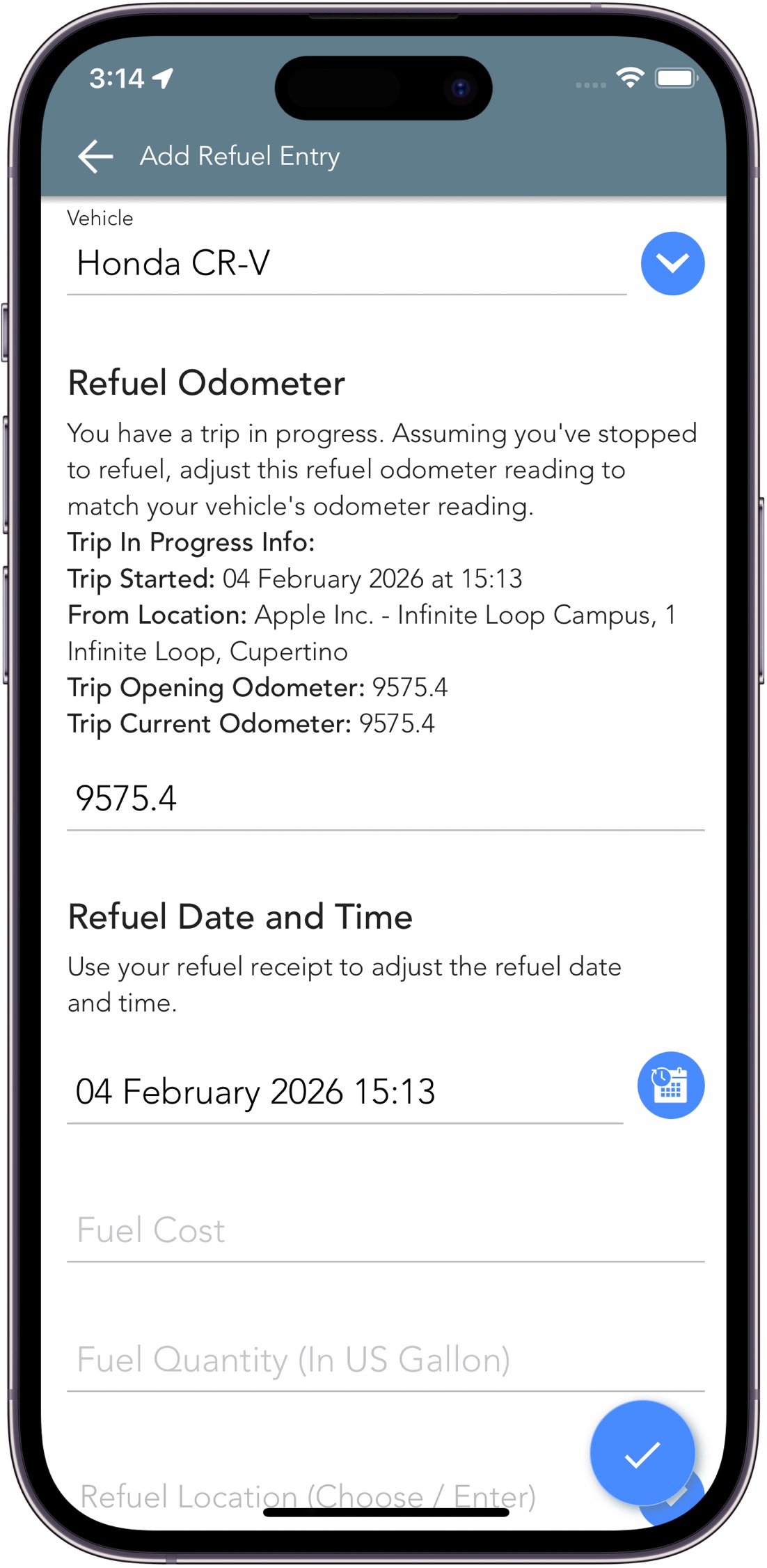
Trip Logbook Fuel Tracker App - Add Refuel Entry
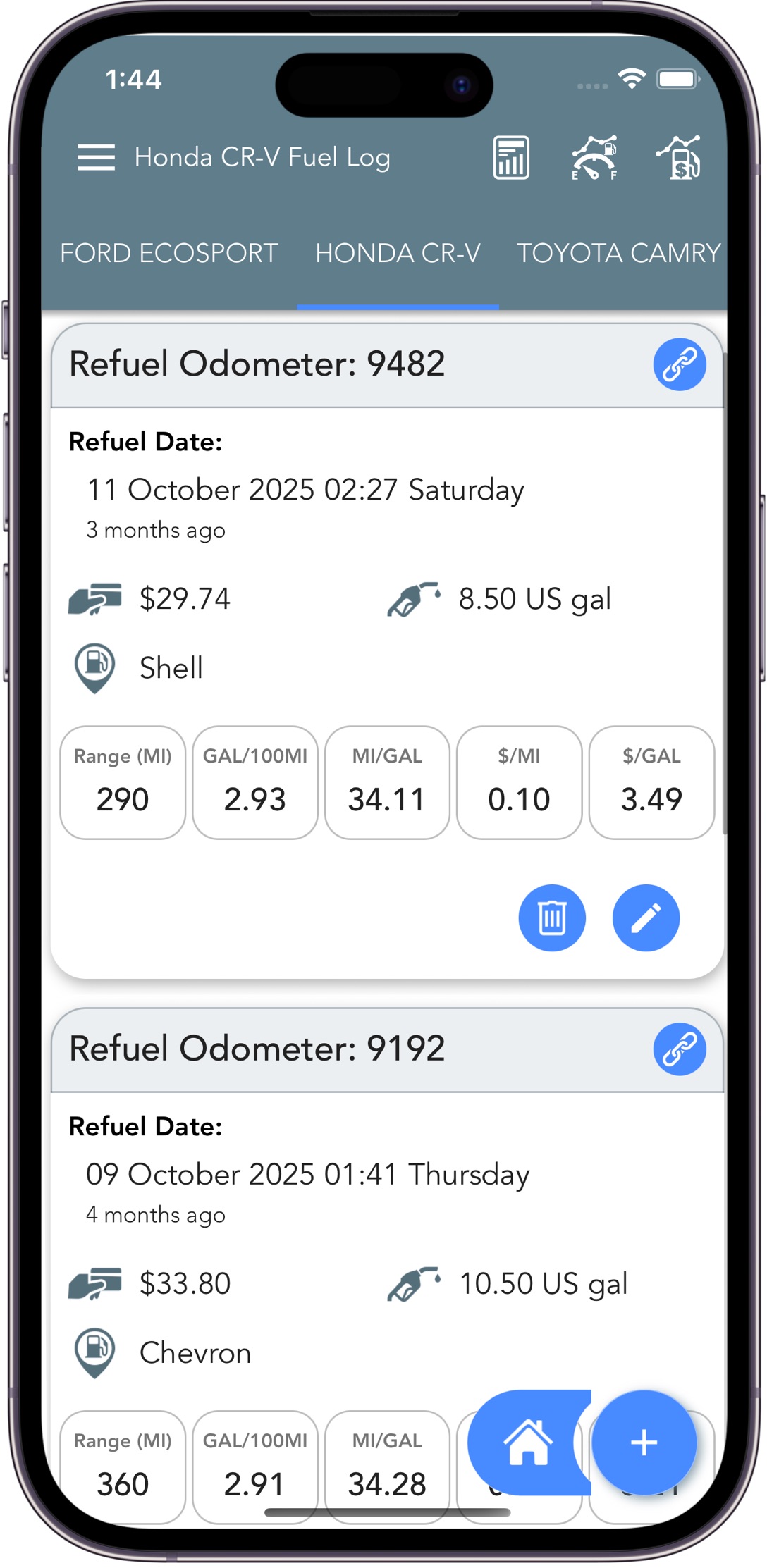
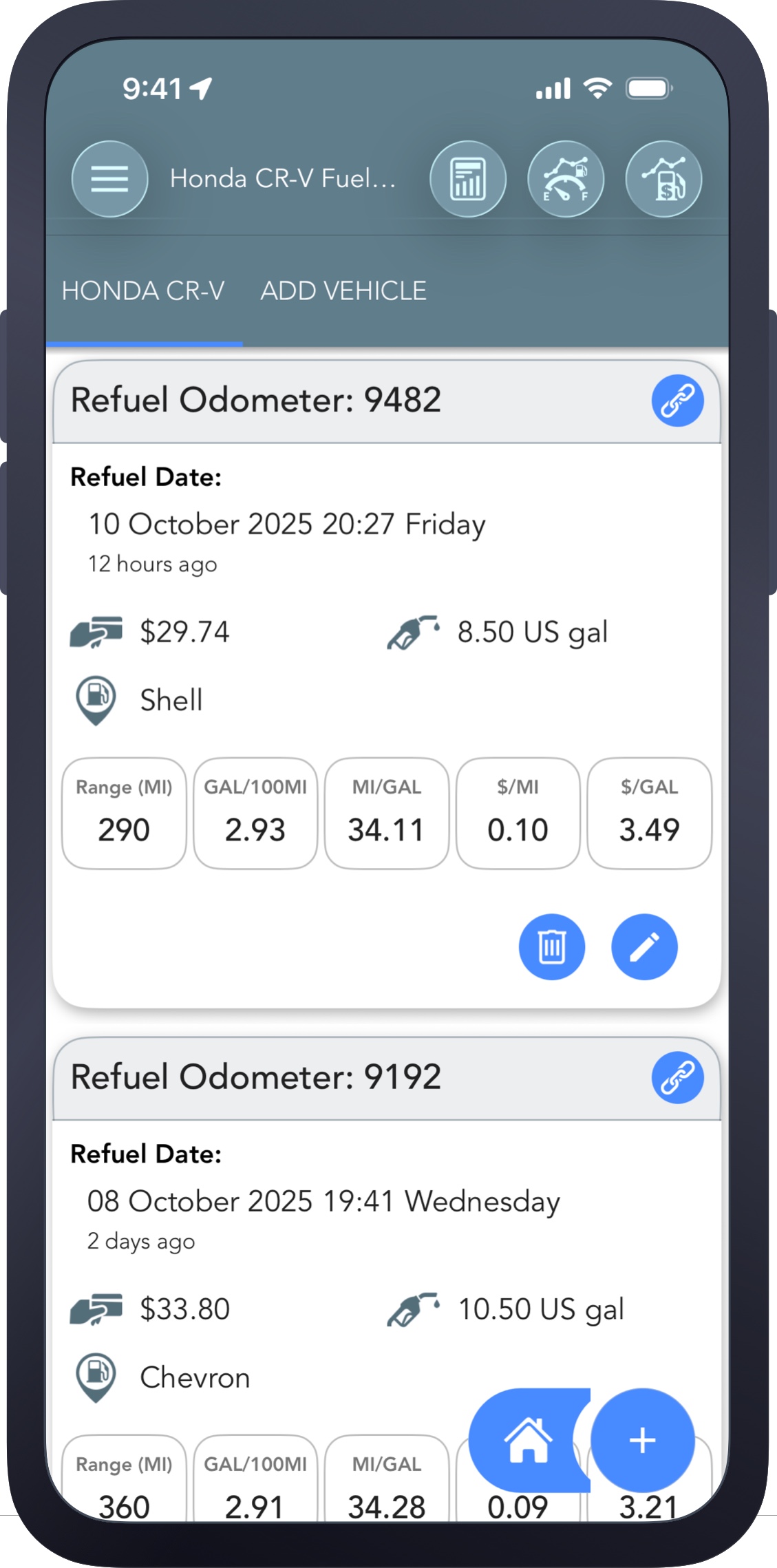
Trip Logbook Fuel Tracker App - Fuel Log

Built for Accurate Fuel Consumption Tracking and Cost Metrics

Trip Logbook’s Fuel Tracker is engineered to deliver precise, reliable fuel consumption insights while giving you the detailed cost metrics drivers search for most. The system uses real‑time mileage data, odometer‑based calculations, and built‑in validation to ensure every refuel entry is accurate—helping you track fuel efficiency, monitor costs, and understand your vehicle’s true consumption over time.

Accuracy You Can Trust

Trip Logbook is designed as a highly accurate fuel consumption tracker, using multiple safeguards and data‑driven calculations to keep your records consistent and dependable.

  • Odometer‑based distance calculation for precise consumption tracking
  • Validation guidance that flags inconsistent odometer readings, dates, or times
  • Refuel‑to‑refuel calculations for the most accurate fuel efficiency results


Fuel Consumption & Cost Metrics

The Fuel Tracker automatically generates detailed metrics that help you understand both your fuel usage and your running costs.

  • Distance range (Miles - mi)
  • Fuel consumption (Miles per Gallon - MPG)
  • Fuel consumption (Gallons per 100 miles - gal/100 mi)
  • Cost per distance (Cost per mile - $/mi)
  • Cost per unit(Cost per Gallon - $/gal)
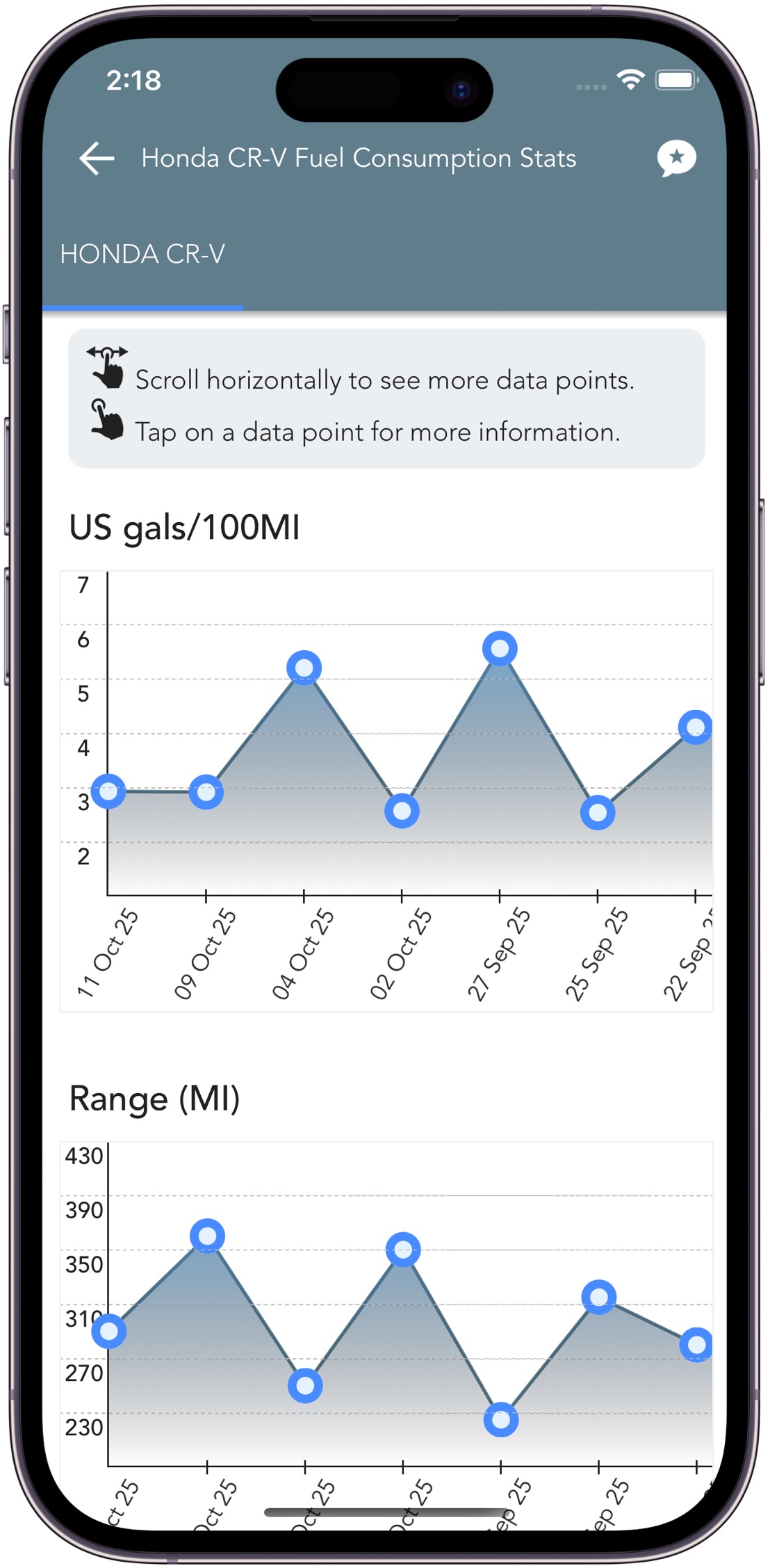
Trip Logbook Fuel Tracker - Interactive Fuel Consumption Stats
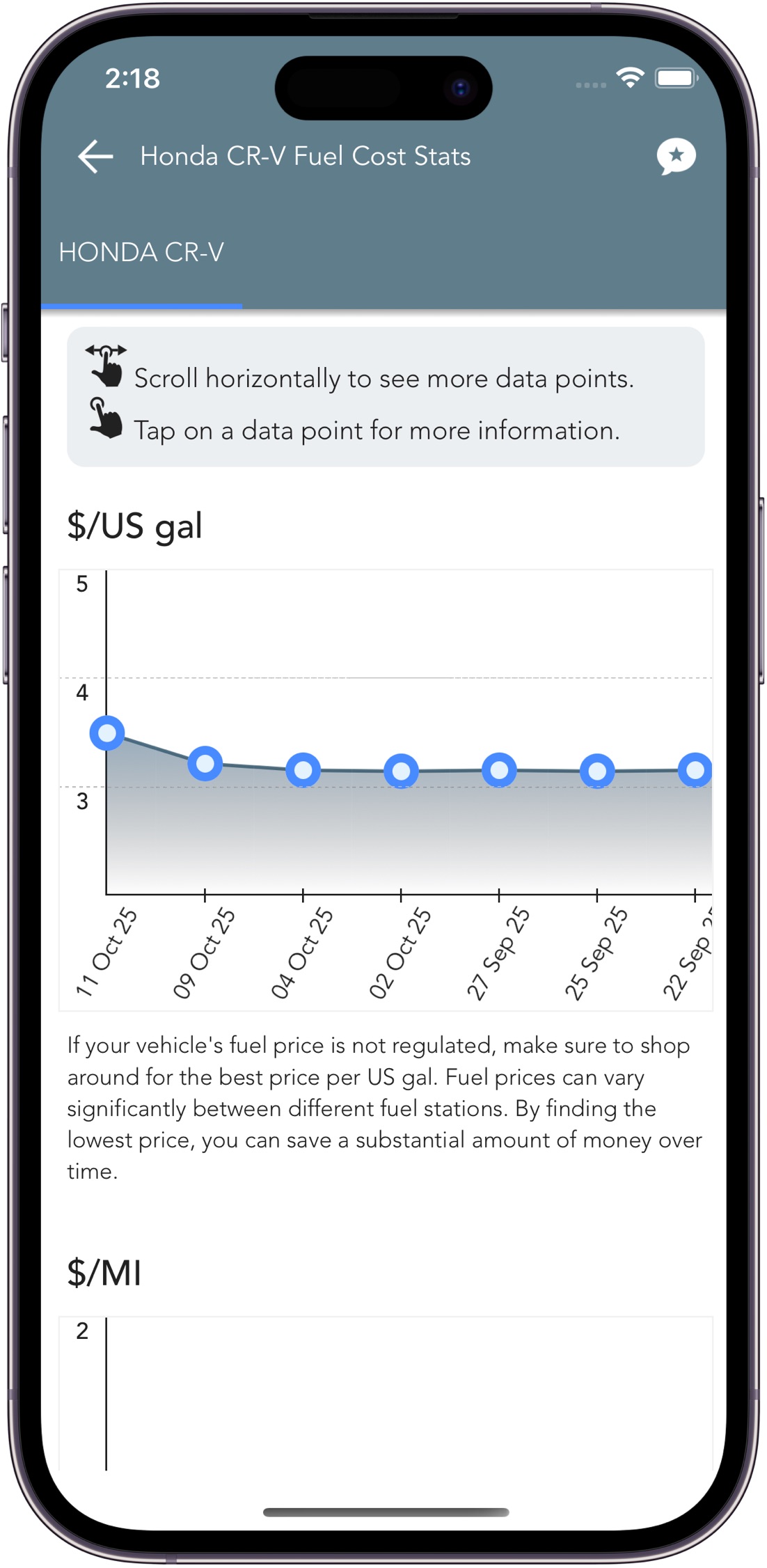
Trip Logbook Fuel Tracker - Interactive Fuel Cost Stats

Track Fuel for Multiple Vehicles with Precision and Clarity

Trip Logbook makes it easy to track fuel usage across all your vehicles. Each vehicle’s fuel data is kept completely separate, giving you clean, structured logs and accurate fuel‑consumption insights without any overlap. Whether you manage one car or an entire fleet, Trip Logbook ensures every refuel, cost, and consumption metric is organised and easy to analyse.

Structured Fuel Tracking for Every Vehicle

Trip Logbook provides dedicated fuel‑tracking data for each vehicle, helping you maintain accurate long‑term records and compare performance over time.

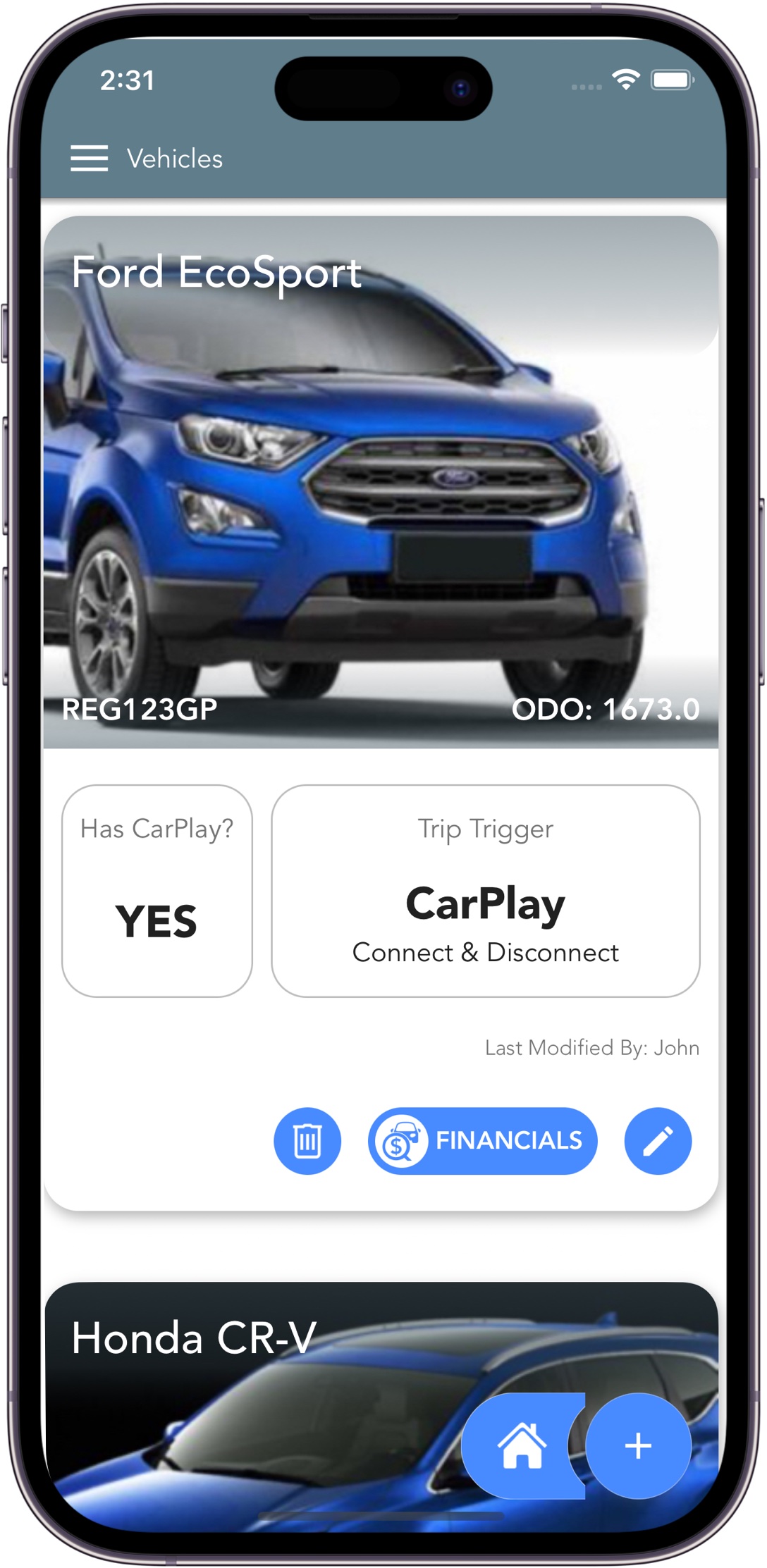
  • Separate fuel logs per vehicle
  • Independent fuel consumption statistics
  • Independent fuel cost statistics
  • Detailed consumption and cost data for every refuel entry
  • Fuel‑consumption and fuel‑cost reports (PDF and CSV)
  • Long‑term tracking for ongoing insights

Fuel Tracker Benefits for Each Vehicle

Tracking fuel per vehicle gives you actionable insights that help improve performance and reduce costs.

  • Monitor fuel efficiency and economy
  • Identify and reduce unnecessary fuel waste
  • Spot potential vehicle issues early—before they become expensive problems
Trip Logbook Fuel Tracker - Interactive Fuel Cost Stats

Fuel Consumption & Cost Reports

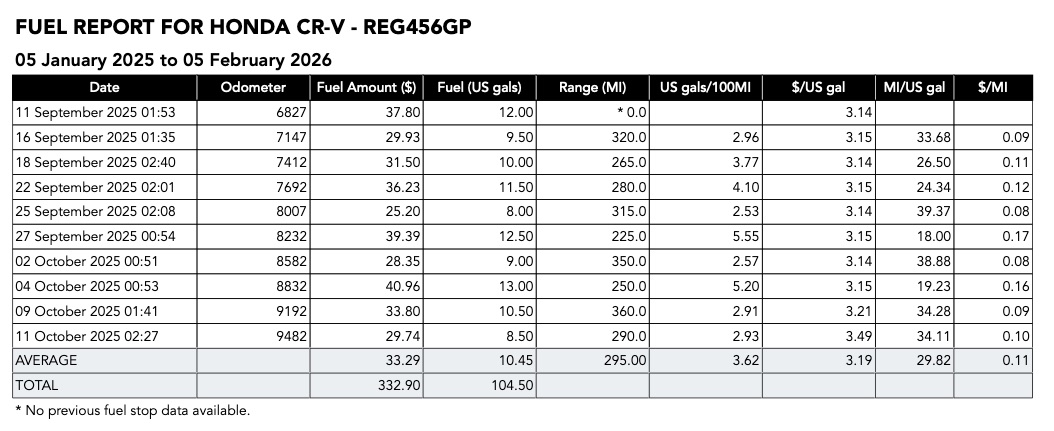
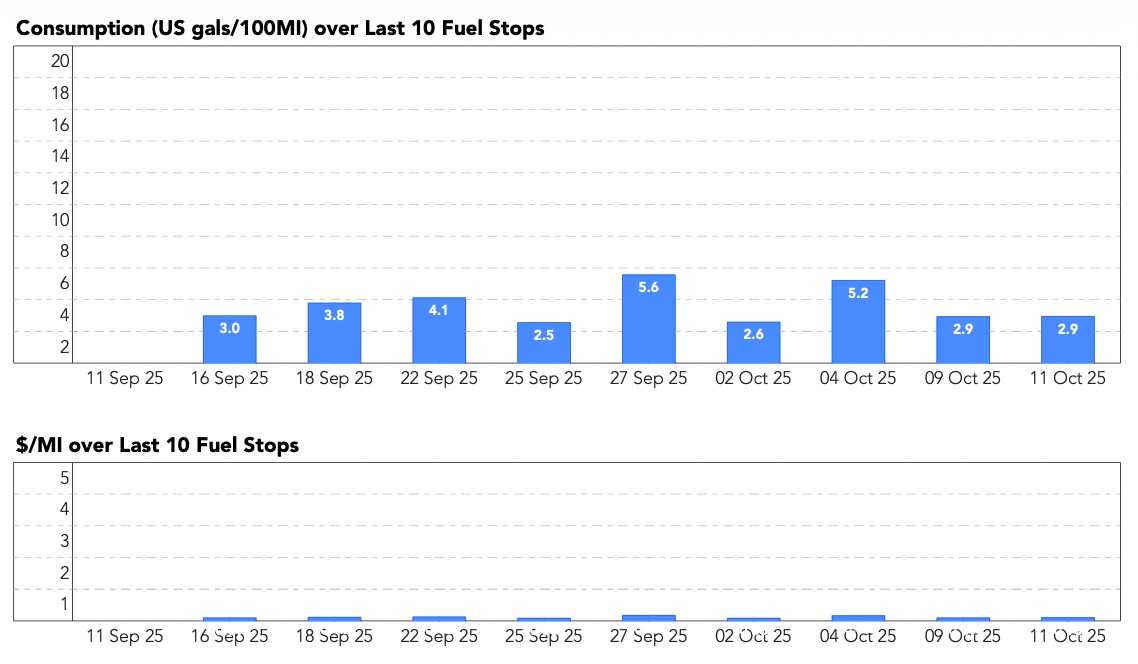
Instantly generate a Fuel Consumption and Cost PDF report or CSV export of your refuels.

Fuel Consumption and Cost Report sample from the Trip Logbook Fuel Tracker app
Fuel Consumption and Cost Report Stats sample from the Trip Logbook Fuel Tracker app

Try the Trip Logbook Fuel Tracker

Now available on both the Apple App Store and Google Play Store. Start logging your refuels today.

We offer a full‑access 30‑day free trial, so you can use the Fuel Tracker with your real‑world driving before you decide.

We want every driver to experience the value firsthand. Trip Logbook should pay for itself many times over — even compared to “free” mileage‑tracking apps.

Tap or click below to download:

Download on the App Store Download Trip Logbook on Google Play

Fuel tracking FAQ

Answers to common questions about using a Fuel Tracker and Fuel tracking.

How to track fuel mileage?

You can track fuel mileage by recording each refuel along with your odometer reading, fuel quantity, and cost. The most accurate method is the refuel‑to‑refuel calculation, where you divide the distance driven by the amount of fuel added. A fuel‑tracking app like Trip Logbook automates this by logging odometer readings in real time, storing each refuel entry, and calculating your fuel consumption and mileage for you.

Which fuel app is the most accurate?

The most accurate fuel‑tracking apps are the ones that use odometer‑based calculations, consistent refuel logging, and built‑in validation to prevent incorrect entries. Apps that rely only on GPS or estimated fuel usage tend to be less precise. The highest‑accuracy systems record your odometer at every refuel, calculate fuel consumption from refuel to refuel, and separate data for each vehicle to avoid mixing results. Trip Logbook follows this method, which is widely considered the most reliable way to track fuel consumption and fuel costs over time.

How to monitor vehicle fuel consumption?

To monitor vehicle fuel consumption, you need consistent records of distance traveled and fuel used. The most reliable approach is to track odometer readings at every refuel and let a fuel‑tracking system calculate your consumption (e.g., MPG). Trip Logbook does this automatically by combining your trip data with each refuel entry, giving you accurate fuel‑consumption statistics, long‑term trends, and cost insights for every vehicle.

Can I drive 10 miles on empty?

It depends on the vehicle, but it’s never guaranteed. Most cars still have a small reserve when the fuel light comes on, but the remaining range varies widely based on driving conditions, fuel tank size, and engine efficiency. Driving on empty can also draw debris into the fuel system or damage the fuel pump. It’s best to refuel as soon as the low‑fuel warning appears rather than relying on an estimated remaining distance.